Improving Event Attendance Accuracy 15% by Redesigning PDF Tickets to Fix 4 Scanning Problems
Contextual research at a university graduation uncovered 4 critical barcode scanning failures. A strategic redesign — redundant barcodes, smart placement, and clear instructions — improved scanning accuracy by 15%.
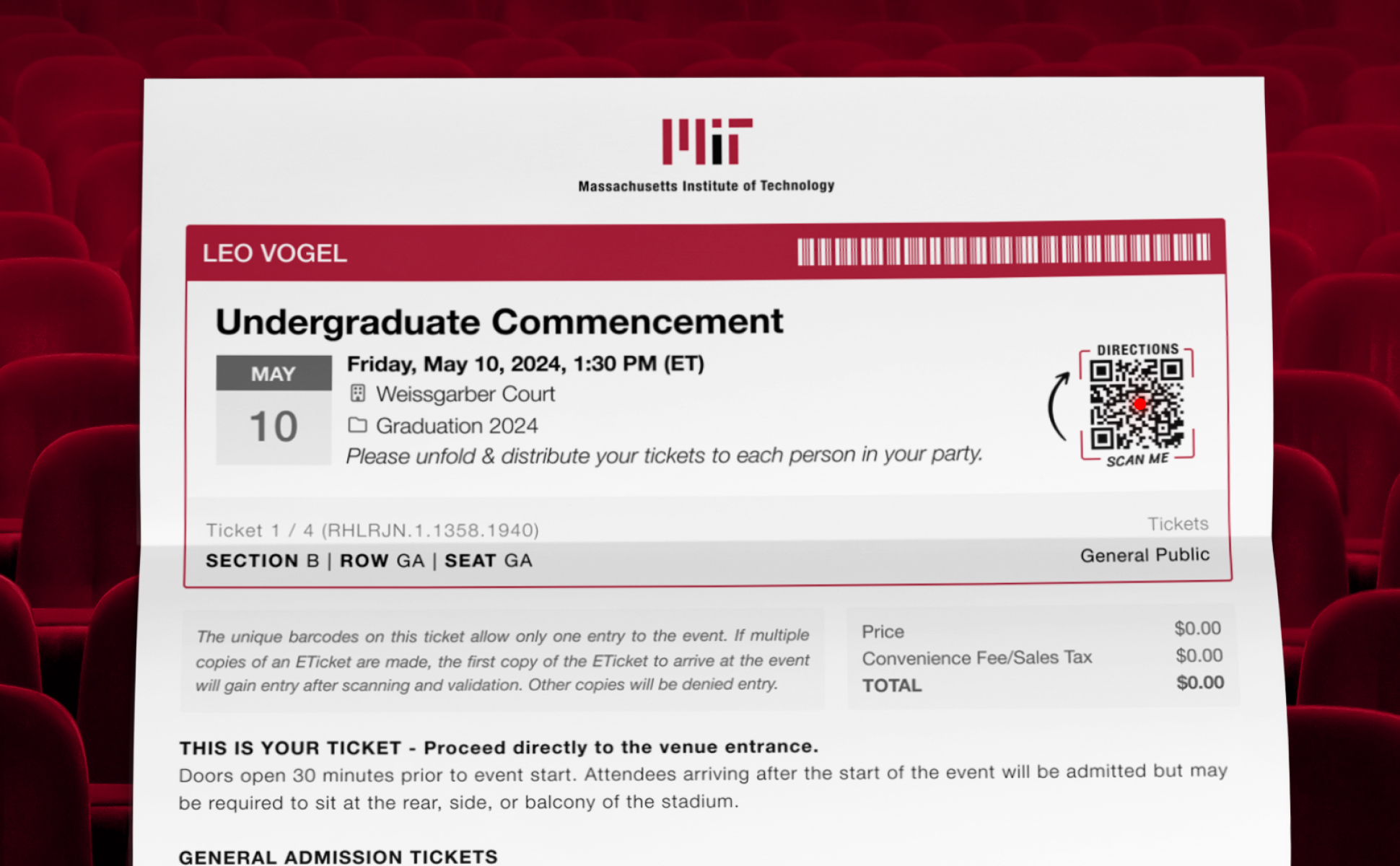
UniversityTickets was a live-event web ticket platform for 500+ universities. Event entrance was slowed when PDF tickets were not scannable due to 4 issues. Strategically placed, redundant barcodes increased attendance accuracy 15%.
Contextual user research at a university graduation event discovered that barcodes on print-at-home PDF tickets were not scannable due to 4 common issues, causing delays with attendee entrance. As the UX design team-of-one, I initiated a redesign project 2 days after the issues were found that solved the problems by increasing the number of barcodes, placing barcodes in strategic locations, and adding instructions. This resulted in a 15% average scanning accuracy for events and sped up entrance.

Scanning problems slowed down attendee entrance to events
Contextual user research observations at a graduation ceremony event uncovered 4 issues preventing barcodes from being scanned: covering, mis-printing, folding, and smudging.
I initiated a redesign project to fix these scanning issues and improve the attendee experience two days after the issues were found.
4 common causes of barcode scanning issues
1. Covering
Some attendees held out a ticket for scanning with the barcode covered by their thumb, without noticing they were doing so.
2. Mis-Printing
Some tickets were misprinted in such a way that the barcode was un-scannable.
3. Folding
Attendees commonly fold tickets in quarters or thirds. This puts creases in the barcodes that make the barcodes difficult to read by the scanning hardware.
4. Water Smudging
Perspiration from sweaty hands, perspiration from water bottles, and tears from emotional parents sometimes caused ink to smudge.
Ensure barcodes can be scanned: backups and strategic placement
🔢 Increase redundancy by adding backup barcodes
By increasing the number of barcodes there would be backups in case one of the barcodes was covered or misprinted or distorted.
⏹️ Place barcodes away from common fold lines
Tickets were often folded in quarters or thirds. Folded barcodes could become difficult to scan. Barcodes were moved away from these common fold lines.
Add instructions to distribute tickets
Adding instructions to attendees for each person in their group to be holding their own, unfolded ticket helped keep the scanning line moving smoothly by eliminating time waiting for tickets to be separated and unfolded.
Unfolded & distributed tickets reduce wait time.
Improved typography helps attendees and staff
Customer name, event name, seating information, location, and event date are all easier to find in dedicated locations and typographic styles.
- Customer's Name — Quickly finding the customer's name is important for greeting attendees at the door.
- Event Title — Attendees need to know that they are bringing the tickets to the correct event.
- Seating Location — This is important so staff and customers can easily locate their correct seat.

Dual Purpose Barcodes *
Scan to Validate (Event Staff)
The QR code barcodes on the tickets are used to validate tickets at the event entrance using specialized scanning hardware with a laser reader.
Scan to Get Directions (Attendees)
These QR codes could serve a dual-purpose by being scannable by event attendees with their smartphone cameras. When scanned by a camera they could open a Google Maps link with directions to the event location.
* This feature didn't launch in the shipped version but was validated as feasible by the CTO.
Additional branding options added
1. Event Photo — The calendar can be replaced with a client-uploaded photo.
2. Custom Color — Defaults to primary brand with option to override with custom category color.
15% increase in attendance accuracy
The number of tickets scanned of tickets sold increased 15%, from 53% to 68%, on average, as a result of the new ticket design — which is now being used by over 500 colleges and universities across the USA and Canada, including MIT.
Lessons for future work
- Contextual observation can uncover big, unknown problems.
- When a digital file becomes a physical object, unexpected issues can arise.
- Design for extremes, not the ideal. Decide how to accommodate content that exceeds available space.
- Leverage existing data to inform design decisions. By analyzing the longest and average text lengths for text content I was able to design a ticket that would work better for most clients.
Ideas for Exploration
Booklet Tickets
Alternate layout options that clients can choose from would offer more flexibility. A quarter-folded layout that looks like a mini book is something I'd like to explore.
Event-Type Specific Tickets
UniversityTickets served four main client types: theater, student activities, athletics, and graduations. Perhaps offering an E-Ticket layout tailored to the needs of each would be better than a single layout balancing the needs of all four.
Additional Analysis
For additional measures of success I would have liked to compare two events at the same school of equal size using the original and the new e-ticket designs. I would compare the amount of time a user spends in line, user satisfaction with ease of finding their seat, and number of times a scanner's laser is activated vs number of times a barcode is successfully scanned.